

OpenAI built ChatGPT as a conversational AI tool that understands natural language and replies with text, images, code, audio, and even video. Open the app today, and you’ll see several plans on the pricing page, and the gap between them confuses a lot of people. This guide breaks down every difference between ChatGPT free and the paid plans, so you know exactly what each tier gives you and which one actually fits your daily routine.
We’ll walk through model access, file uploads, deep research, memory, custom GPTs, automation tools, coding support, and overall speed. By the end, you’ll know whether the free plan covers your needs or whether upgrading makes real sense for you.
Most people skim a pricing page, see a list of checkmarks, and still walk away unsure what actually changes day to day. Phrases like “Limited deep research” or “Expanded memory” sound vague until you see them next to real usage habits. That’s exactly the gap this guide tries to close, feature by feature, rather than just repeating the marketing copy from the official pricing page.
ChatGPT Plans At A Glance
ChatGPT currently splits into three main consumer tiers: free, go, and plus
ChatGPT free
ChatGPT free works well for anyone who wants to try an AI chatbot without spending money, or who only chats occasionally and doesn’t need advanced tools. It’s the plan most new users start on by default.
ChatGPT go
ChatGPT go sits in the middle of the lineup. It suits light users who like what the free tier offers but keep bumping into daily usage caps and don’t want to pay full price for a plan loaded with extras they won’t touch.
ChatGPT plus
ChatGPT Plus targets people who chat daily and want more from the assistant, extended limits, the Codex coding agent, voice with video calls, and the ability to build and publish custom GPTs of their own.
Beyond these three consumer tiers, OpenAI also sells pro, business, and enterprise plans with nearly unlimited access, plus a pay-per-token API for developers who want to build their own apps on top of the underlying model rather than chat through the regular interface.
This article zooms in on ChatGPT free and ChatGPT plus specifically, since most everyday users end up picking between these two rather than go, pro, or the API.
Pricing Breakdown: Free, Go, And Plus
ChatGPT free costs nothing you need to sign up with an email address and start chatting right away, with no card required. ChatGPT plus runs about $20 a month, while the in-between go tier costs roughly $8 a month and may show ads to help cover the lower price.
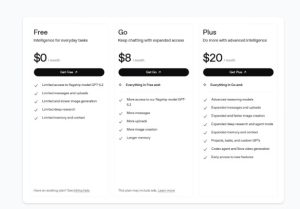
The real difference isn’t the price tag by itself; it’s what you unlock once you pay. The paid plan adds more AI models, the Codex agent, voice with video, the ability to create custom GPTs, and early access to fresh features, along with much higher message and upload limits across the board. Meanwhile, the no-cost plan still hands you the flagship model, file uploads, basic data analysis, and image generation, just wrapped in tighter daily and weekly limits. Many users also combine ChatGPT with other tools, such as a text to video AI tool to turn scripts, ideas, or blog posts into engaging videos.
Let’s walk through each feature one by one so you can see exactly where the free option falls short and where it genuinely holds up just fine against the paid tiers.
Model Access: Standard Vs Thinking Modes
Both free and paid users reach OpenAI’s flagship model along with its deeper “Thinking” reasoning mode, which spends more time working through a problem before answering. The real difference shows up in how easily you can switch between them and how often the system lets you use the smarter mode.
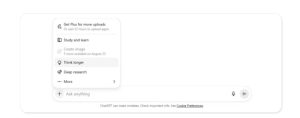
Plus subscribers pick between the standard fast model and thinking mode, in either standard or extended depth, for every single message they send. Free-tier users have to manually select thinking from a small menu next to the input bar each time, and the system caps how often that option becomes available.
Usage limits matter even more here. ChatGPT free lets you send around 10 messages every five hours before the chatbot quietly switches you over to a lighter, smaller version of the model. You also get only one thinking-mode reply per day once you’re back on the regular plan.
Plus removes most of that friction. Subscribers get roughly 160 standard messages every three hours and thousands of thinking-mode replies each week, though OpenAI reserves the right to adjust these numbers at any time based on overall demand.
Plus users can also switch on a handful of legacy models from the settings menu if they prefer an older version for a specific task. The free plan skips this option entirely and only exposes the current flagship model.
Image generation works at a similar quality level on both tiers, but ChatGPT free caps you at a small handful of images per day. Hit that wall, and you either wait until the next day resets or move up to a paid plan.
Video generation through Sora rounds out the multimodal picture. The free plan now supports short, lower-resolution clips, while Plus unlocks higher resolution footage and noticeably longer runtimes per generation.
File Uploads And Multimodal Input
ChatGPT free restricts you to a small number of file uploads per day, while plus subscribers get more headroom dramatically inside a rolling three-hour window instead of a once-a-day reset. OpenAI can tighten these limits further during high-traffic periods, so don’t be surprised if the exact cap shifts slightly over time.
Both plans handle image understanding well. Upload a photo and ask the chatbot to describe it, compare two outfits, or pull text out of a screenshot, and you’ll get a SOLID, detailed response, whether you’re running the free version or Plus.
Voice chat also works on both tiers, but the experience differs noticeably. The no-cost plan runs on a lighter voice model with a daily time cap, while Plus runs the full voice model with close to unlimited daily use. Plus alone adds voice-with-video, letting you share your camera or screen and get real-time spoken feedback, something the free plan doesn’t include yet.
Web Search, Deep Research, And Fact-checking
Both ChatGPT free and plus can search the live web for current information instead of relying only on older training data. Click the plus icon near the input bar, choose the search option, and the chatbot pulls fresh results straight into its answer.
Deep research pushes this idea much further by running dozens of searches, reading through multiple sources, and compiling everything into one structured report. This feature shines for students, journalists, or anyone who needs a quick literature review instead of spending hours browsing manually.
Here’s where the free plan shows its biggest limitation: you only get a handful of deep research reports per month. Plus multiplies that allowance several times over, which matters a lot if research becomes part of your regular weekly workflow.
Plus subscribers also gain an edge that most people overlook; they can point to deep research at connected sources like GitHub or Google Drive, and even list exact websites the chatbot should check before writing the report. The free tier skips this connector option entirely.
Report quality differs, too. Free-tier reports tend to run shorter and occasionally misquote a source word-for-word. Plus runs its reports through the stronger thinking model, which writes longer answers, organizes findings into tables and bullet points, and quotes sources more carefully and accurately. Either way, treat any AI-generated research as a starting point rather than a finished product, and always verify the important facts yourself, since large language models can still produce confident-sounding errors.
Data Analysis Tools
ChatGPT free includes a Python-based data analysis tool, most people just call it advanced data analysis, though you only get a couple of uses per day before hitting a wall. Plus raises that ceiling considerably without publishing an exact number, but in day-to-day practice, the output quality between the two tiers looks fairly similar.
This tool reads spreadsheets, JSON files, and other common formats, builds charts, runs simple regression models, and simulates “What if” scenarios on request. Upload a sales spreadsheet and ask the chatbot to chart monthly revenue by product, and both the free and paid plans hand you a usable chart, though Plus tends to layer in more variables at once without slowing down.
Ask either plan to model a hypothetical scenario, say, closing your shop early on Sundays, and you’ll get a clear answer with concrete numbers and percentages attached. Neither tier is flawless at visualizing complex comparisons, so always double-check any chart before you lean on it for a real business decision.
Memory, Context, And Personalization
Chat history stays unlimited on both ChatGPT free and plus; you can scroll back through old conversations whenever you want, no matter which plan you’re on. Memory works differently, though. Memory determines what the chatbot actively remembers and applies to brand-new conversations, separate entirely from your raw chat history archive.
OpenAI caps how much it saves inside memory, and that cap shrinks noticeably if you’re on the free plan. Some users notice their memory fills up faster after downgrading from plus back down to the free tier.
Context window size essentially how much text the model can “See” at once, also splits sharply between plans. The standard model holds a smaller context window on the free plan compared to Plus, which roughly translates into fewer pages of readable text per single conversation. The thinking model expands that window considerably on both tiers, but plus still pulls ahead in raw capacity once you compare the numbers directly.
You can always ask ChatGPT what it currently remembers about you, and you can tell it to forget specific details whenever you want. The chatbot stops using that information going forward, though the original conversation itself stays inside your chat history until you manually delete it from settings.
Custom Gpts And The Gpt Store
Anyone on the free plan can browse and use the gpt store, a library full of community-built chatbots tuned for specific jobs, writing assistants, research helpers, even niche tools like astrology readers or fitness coaches. Each listing shows a star rating and sample conversation starters, so you know roughly what you’re getting before you click in.
Where ChatGPT free falls short is creation, not usage. You can use existing gpts all day long for free, but building and publishing your own requires a plus subscription. With plus, you write custom instructions, attach reference files for extra knowledge, choose a default underlying model, and even connect external actions through an openapi schema for more advanced setups.
Study And Learn Mode
Study and learn ships on both ChatGPT free and plus at no extra cost either way. Turn it on, and instead of dumping a wall of text at you, the chatbot first asks about your level and goals, then walks you through concepts step by step, checking your understanding along the way before moving forward.
This mode works great for exam prep or daily homework help on either plan. The catch: study and learn perform noticeably better when memory stays active throughout the session, so free-tier users who hit their memory cap midway through studying may notice the experience getting choppier or repetitive.
Projects
Projects let you group related chats, files, and instructions together in one place for ongoing work, and both ChatGPT free and plus include this organizational feature. Drag any existing chat straight into a project folder, and you can even set up project-only memory that intentionally ignores your broader saved memories.
The real gap shows up in storage limits. Plus lets you stash up to 25 files inside a single project and upload as many as 10 of those at the same time. The free plan caps you at just a handful of file uploads per day across your entire account, which makes large, file-heavy projects much harder to manage over time.
Tasks: Built-in Automation
Tasks ship exclusively with the paid plan right now. This feature lets the chatbot run a saved prompt automatically on a schedule and ping you through a push notification or email genuinely useful for daily news digests or recurring personal reminders.
The free version doesn’t include tasks in any form at the moment. Even on plus, tasks currently caps out at around 10 active automations running at once, and the feature doesn’t yet support voice input, file uploads, or custom gpts inside the automated runs themselves.
Canvas: A Side-by-side Workspace
Canvas opens a split-screen view where you edit the chatbot’s writing or code directly inside the window, instead of copying text out of a chat bubble every single time. Think of it as a lightweight document editor or code editor built right into the conversation itself.
Good news here: canvas works on both ChatGPT free and plus, so you don’t need to spend a single dollar just to get this more hands-on, side-by-side editing experience.
Agent Mode: Letting ChatGPT Take Action
Agent mode hands the chatbot a real web browser, a code interpreter, and connectors to services like GitHub and Google Drive, then lets it complete multi-step tasks entirely on its own, filling out online forms, comparing flight prices across sites, or pulling together a competitor research report from scratch.
This one stays exclusive to plus subscribers. The free plan doesn’t include agent mode in any form whatsoever, and even plus subscribers only get a limited monthly allowance of agent runs rather than fully unlimited access.
Treat agent mode carefully whenever it touches account logins or sensitive personal data. Letting any AI agent browse the open web on your behalf carries real risk, so many teams prefer running automated workflows through a properly guarded AI platform instead of handing raw account access over to a general-purpose chatbot.
Codex: Built For Developers
Codex turns plain-language instructions into working code across languages like Python, JavaScript, and go. It can also read through your existing codebase, flag bugs before they ship, and answer detailed technical questions about your specific project.
Codex sits firmly behind the paywall, too. ChatGPT free doesn’t unlock this agent at all, under any circumstances. You can connect codex to your GitHub account through the browser, or run it through a dedicated CLI tool or IDE extension instead, with usage limits that shift depending on which underlying model you pick and whether tasks run locally on your machine or out in the cloud.
Speed, Uptime, And Reliability
Your plan type affects more than just available features; it directly affects how fast you get answers, especially during busy hours of the day. Free-tier users sit further back in the response queue, which can mean waiting several minutes instead of mere seconds for a reply during peak traffic.
You’ll feel this lag mostly when running the thinking model or generating a full deep research report, since both tasks demand far more computing power behind the scenes. Lighter, everyday chat messages stay reasonably fast on the free plan most of the time, even during busy periods.
Usage caps compound that slows down even further. The free plan burns through deep research credits, image generation slots, and thinking-mode replies far quicker than plus does, so heavy daily users end up hitting walls repeatedly throughout a single working day.
ChatGPT Free Vs Plus: Quick Comparison Table
| Feature | Free | Plus |
| Flagship & Thinking models | Limited daily access | Full access, Standard & Extended |
| Legacy models | Unavailable | Available in Settings |
| Response speed | Slower during peak hours | Faster, priority queue |
| Context window | Smaller | Noticeably larger |
| Voice mode | Standard, daily time cap | Standard + Advanced + video |
| Agent mode | Unavailable | Limited monthly runs |
| Projects | Available, low file cap | Available, high file cap |
| Tasks (automation) | Unavailable | Available |
| Use existing GPTs | Available | Available |
| Build custom GPTs | Unavailable | Available |
| Image generation | Limited daily quota | Higher daily quota |
| Sora video generation | Basic, shorter clips | Extended resolution & length |
| Canvas | Available | Available |
| Deep research | Few reports monthly | Several times more monthly |
| Codex | Unavailable | Available |
| Monthly price | $0 | Around $20 |
Which Plan Actually Fits You?
Students And Casual Users
If you only chat occasionally, or you’re a student leaning on study mode for homework most evenings, the free plan probably covers everything you actually need. The thinking mode handles most schoolwork just fine, and you can lean on existing custom GPTs for writing help or presentation prep without spending a cent.
Only consider upgrading once deep research becomes a regular part of your weekly routine, or once you keep hitting memory limits during longer study sessions that span multiple chats.
Professionals And Power Users
If you rely on the chatbot throughout your entire Workday, skip the free plan and go straight for plus. Getting quietly bumped down to the mini model mid-task gets frustrating fast, and you’ll notice the faster, priority responses during busy hours almost immediately.
Plus also unlocks tasks and agent mode, both of which save real time on repetitive work, plus the ability to build your own custom GPT tailored exactly to your workflow instead of relying on someone else’s public creation.
Developers And Coders
For small scripts, quick bug fixes, or short code reviews, ChatGPT free handles the job reasonably well on its own. Upload a single file, ask for optimization tips, or use Canvas to tweak code side by side in real time.
But the free plan leaves out Codex entirely, and that’s a significant loss if you write code on a regular basis. Codex goes well beyond simple snippet generation; it can untangle messy logic, fix recursive bugs, and refactor larger files in one pass, which makes the upgrade genuinely worthwhile for anyone coding daily as part of their job.
How These Plans Compare In Real Daily Use
Beyond the raw feature list, the practical experience differs in small ways that add up over a normal week. Free-tier users tend to plan their usage around resets, saving a deep research credit for something important, or waiting for the daily image quota to refresh before generating a batch of visuals. Plus subscribers rarely think about limits at all, which changes how naturally they fold the chatbot into daily tasks like drafting emails, reviewing code, or building quick reports.
That mental overhead matters more than people expect. Constantly checking whether you have messages left, or whether today’s research credit is still available, breaks focus in a way that a flat, generous limit avoids entirely. If your work depends on consistent access throughout the day, that alone can justify the monthly fee even before you touch codex or agent mode.
Conclusion: ChatGPT Free Or Paid?
Start with ChatGPT free and keep using it until the limits genuinely start slowing you down in a way you notice. Most casual users never need to leave this tier at all. Upgrade to Plus only once you specifically need extended thinking mode, the ability to publish your own custom GPTs, codex, tasks, or agent mode.
If you use the chatbot at work daily for writing, research, data analysis, or coding, the roughly $20 monthly fee for Plus usually pays for itself in saved time, especially once you factor in faster responses during peak hours and a much larger deep research allowance every month.
FAQ
Is ChatGPT Available For Free?
Yes, ChatGPT offers a free version at no cost. Use it through your browser or the mobile app without entering any payment details.
Which ChatGPT Is Free And Best?
ChatGPT’s official free version is the best starting point for most people. You can reach it directly through the ChatGPT website or the official mobile app.
What Can You Do With ChatGPT Free?
You get flagship model access with daily limits, file uploads, basic image generation, short sora video clips, web search, limited deep research, canvas, study mode, projects, and full access to browse the GPT store.
Should I Pay For ChatGPT?
Pay only if you regularly hit free-tier limits, specifically need Codex or agent mode, or want to build and publish your own custom GPTs for others to use. Light, occasional users rarely need to upgrade at all.
What’s The Difference Between ChatGPT free And The pro Plan?
Pro sits above plus with nearly unlimited usage across every single feature, aimed squarely at professionals who lean on the chatbot constantly throughout the day, while the free plan caps nearly everything tightly by direct comparison.



