

The best photo-merge editors in 2026 are Overchat for the cleanest AI-powered blend, Photopea and GIMP for hands-on free editing, and Canva for quick layouts. Below we compare six on quality, ease and cost, and flag exactly whether each one watermarks your export.
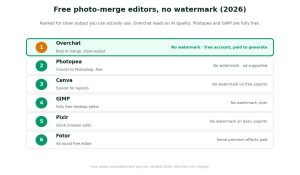
Are these editors free, and do they watermark your export?
Search for a free photo merger, and you will find dozens of tools. The problem is that many are only free until you try to download: the result arrives stamped with a watermark, shrunk to a low resolution, or locked behind a sudden paywall. So before trusting any tool, it is worth checking four things.
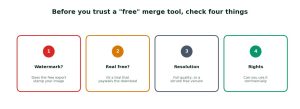
Every tool on this list passes those checks for its core merge feature — either it is completely free, or it produces clean, watermark-free output. Here is where each tool actually stands. Photopea and GIMP are completely free and never add a watermark, making them the true no-cost picks. Canva and Pixlr have generous free tiers that keep basic exports clean, though some assets and advanced features are paid. Fotor’s core editing is free, but some premium effects stay watermarked until you upgrade. Overchat is freemium: the account is free, but generating the final combined image is a paid feature, in return for HD, watermark-free output you can use commercially. So if your only goal is zero cost, Photopea or GIMP are the answer; if you want the cleanest automated blend and will pay a little for it, Overchat is the pick.
Quick comparison
| Tool | Free? | Watermark | AI merge? | Best for |
| Overchat | Free account; paid to generate | None | Yes | Cleanest AI blend |
| Photopea | Fully free (ads) | None | No | Photoshop-style control |
| Canva | Free tier | None on free exports | Partial | Easy layouts |
| GIMP | Fully free | None | No | Offline desktop editing |
| Pixlr | Free tier | None on basic exports | Partial | Quick browser edits |
| Fotor | Free tier | Some premium effects paid | Partial | All-round editing |
The six editors in detail
1. Overchat — the cleanest AI merge
If you want the best-looking result with the least effort, Overchat is the pick. You can combine images with AI by uploading two photos and describing the merge in plain English; the AI matches lighting, colour, depth and perspective and blends the edges into one seamless picture. Crucially for this list, the output is HD with no watermark, and you own it and can use it commercially. The honest catch: it is freemium. You start with a free account, and there are free tools on the platform, but generating the final combined image is a paid feature. If clean, realistic output matters more than paying nothing, it is worth it.
| Pros | Cons |
| + No watermark, HD, commercial use
+ Describe-to-merge — no manual masking + Matches lighting and perspective automatically + Five aspect ratios, results in seconds |
– Generating is a paid feature
– Not for offline, fully-free workflows |
It is also worth knowing that this combiner is just one tool inside a much larger app. Overchat AI is an all-in-one platform with more than 150 purpose-built tools spanning image, video, audio and text — image generation, video creation, transcription, writing and more — all running on the latest models from GPT, Claude, Gemini, Grok, Kimi and Qwen. It works on the web, iOS and Android, and the company says it is used by more than 350,000 people. That breadth is where the value sits: the same account that merges your photos can stand in for separate ChatGPT, Claude and Gemini subscriptions, so if you already wanted those, the image tools effectively come at no extra cost.
2. Photopea — free, and closest to Photoshop
Photopea is a browser-based editor that looks and works remarkably like Photoshop, including layers and masks for combining images by hand. It is completely free, supported by ads, and exports without a watermark. There is a learning curve if you want a manual composite, but for a free tool with real editing power, nothing else comes close.
| Pros | Cons |
| + Fully free, no watermark
+ Photoshop-like layers and masks + Runs in the browser, opens PSD files |
– Manual work, not AI-automated
– Ads in the free interface |
3. Canva — easiest for free layouts
Canva is the friendliest option for putting two photos into one frame or collage. Its drag-and-drop editor and templates make it effortless, the free tier is generous, and standard exports carry no watermark. It leans toward arranging photos rather than truly blending them, but for social graphics that is usually exactly the job.
| Pros | Cons |
| + Very easy, template-driven
+ No watermark on free exports + Great for collages and social posts |
– More arranging than seamless blending
– Some assets are premium-only |
4. GIMP — fully free, forever
GIMP is the open-source desktop editor that has been free for decades and never adds a watermark. It handles layered composites much like Photoshop and runs offline, which suits anyone who prefers software they install over a web app. Like Photopea, it rewards a bit of learning.
| Pros | Cons |
| + Completely free and open-source
+ No watermark, works offline + Powerful layered editing |
– Steeper learning curve
– No AI-assisted merging |
5. Pixlr — quick, free browser edits
Pixlr sits between a simple collage maker and a full editor, running in the browser with no install. Basic exports come without a watermark, and it is handy for a fast merge on any device. Some advanced features sit behind a paid plan, but the core editing is free.
| Pros | Cons |
| + Free, no install, no watermark on basics
+ Fast for simple merges + Works on any device |
– Advanced features are paid
– More manual than AI tools |
6. Fotor — an all-round free editor
Fotor bundles a photo combiner into a broader editing suite. The core editing is free, though some premium effects and assets are paid and can carry a watermark until you upgrade. It is a reasonable all-rounder if you want editing tools alongside the merge feature.
| Pros | Cons |
| + Combine plus a full editor
+ Free core editing + Good for light retouching |
– Some premium effects are watermarked
– Best features need an upgrade |
The verdict
| If you want… | Use |
| The cleanest AI blend (freemium) | Overchat |
| Free, Photoshop-style control | Photopea |
| The easiest free collages | Canva |
| Fully free, offline editing | GIMP |
| A fast free browser edit | Pixlr |
For a truly no-cost merge, Photopea or GIMP win. For the most realistic result with the least effort, Overchat is worth the paid generation.
FAQ
What is the best free photo-merge editor with no watermark?
Photopea and GIMP are the best fully free options with no watermark; Canva is easiest for layouts, and Overchat gives the cleanest AI blend (free account, paid to generate).
Can I combine images with AI for free?
You can start free on several tools. Overchat gives a free account with paid generation; for fully free AI-assisted edits, Canva and Pixlr have free tiers, though they are less automated.
Which free tools add a watermark?
Many trial-based tools do. Photopea and GIMP never watermark; Canva and Pixlr keep basic exports clean; Fotor may watermark some premium effects until you upgrade.
Do free photo mergers reduce image quality?
Some free tiers export at lower resolution. Photopea, GIMP and Overchat produce full-resolution output; always check the export settings before you download.
Can I use merged photos commercially?
Often yes, but check each tool’s terms. Overchat lets you own and commercially use your combined image; free editors like GIMP and Photopea also allow commercial use.
Which is easiest for beginners?
Canva for layouts and Overchat for AI blends are the most beginner-friendly, since neither needs manual masking. Photopea and GIMP offer more control but take longer to learn.
Sources
Overchat combiner details (describe-to-merge, lighting/colour/depth/perspective matching, five aspect ratios, HD PNG, no watermark, commercial use, free account with paid generation) verified on overchat.ai/image/ai-image-combiner, 2026. Overchat platform details (150+ tools; models; web, iOS and Android; user figure) per the company, 2026. Other tools described by their generally documented free and watermark policies.
Disclosure: this roundup features Overchat AI and links to its image combiner. Rankings reflect publicly stated capabilities, not paid placement.


