

Scroll through TikTok or Instagram reels for five minutes, and you will notice a pattern. Faceless videos with sharp captions, smooth AI voiceovers, and perfectly synced background footage are everywhere. Most people assume these creators have a professional editing setup behind the scenes. The reality? Many of them are using a single browser-based tool called Wava AI.
But does Wava AI actually live up to the hype? Is it worth spending money on, or does it fall short in ways that matter? This review covers everything, including features, pricing, real advantages, honest drawbacks, and who should actually consider using it in 2026.
What Is Wava AI?
Wava AI is a browser-based video generation platform built specifically for short-form, faceless content. The core idea is straightforward: you either write a script or let the AI generate one for you, and the platform handles everything else, background footage, AI voiceover, captions, and the final edit.
No video editing experience is required. No software installation. No timeline dragging. The entire workflow runs through a web interface, which means it works on any device, including Chromebooks, laptops, and smartphones.
The platform primarily targets creators running faceless channels on TikTok, YouTube Shorts, and Instagram reels. Think motivational pages, Reddit story channels, history explainers, finance breakdowns, and true crime narratives, the formats that dominate short-form feeds today. With over 1.5 million creators reportedly using the platform, wava AI has positioned itself at the center of this growing automated video production trend.
Whether you are a beginner exploring no-edit video creation or an experienced marketer looking to scale your social media content strategy, wava AI promises to cut production time down to minutes.
How Does Wava AI Work?
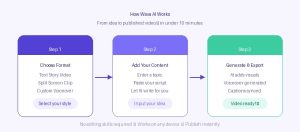
The workflow is designed to remove every possible friction point from video creation. Here is how it breaks down:
Step 1: Choose your format. Select from text story videos, split screen clips, or custom voiceover projects depending on what style you want to create.
Step 2: Input your content. Enter a topic, paste a script you have written, or let the AI generate a complete story from a basic prompt.
Step 3: generate and export. The AI assembles the visuals, narration, captions and edits into a finished video ready for publishing.
The whole process from idea to exported video can take under ten minutes. For creators who previously spent hours in a video editing timeline, that difference is significant. This kind of AI-powered content automation is exactly what modern creators need to stay competitive.
Core Features Of Wava AI
Text story videos
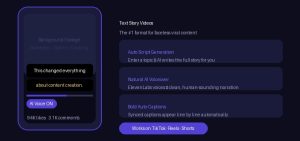
This is the flagship feature and the format most associated with faceless content creation. You input a topic or paste a script, and wava AI converts it into a caption-driven video where bold text appears LINE by LINE, synced to an AI voiceover, with background footage running underneath.
This is exactly the style you see on the majority of viral faceless TikTok accounts. The format hooks viewers through storytelling and narrative-driven content, and it works consistently across platforms. Creators who want to build audiences without appearing on camera rely heavily on this mode. It is one of the most effective passive income content formats available today.
Split screen video mode
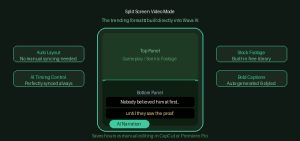
Split screen content has become one of the most replicated formats across short-form social media. The typical setup shows satisfying gameplay, cooking footage, or scenic visuals on one half while a narrated story plays over the top. Wava AI builds this layout directly into the platform.
Users do not need to manually sync two video layers inside editing software. The AI selects the composition, handles timing, and assembles the layout automatically. For anyone who has tried to create this format in CapCut or Premiere Pro manually, the time saving here is real. This dual-layer video format is especially popular in the Reddit stories niche and motivational content space.
Elevenlabs voiceover integration
Wava AI uses ElevenLabs for its text-to-speech engine, which is one of the most respected providers in the AI voice space. The voices produced are clean, natural-sounding, and far removed from the robotic monotone that plagued earlier AI narration tools.
What sets Wava apart from competitors here is the custom voice import option. Creators can upload their own recorded voice or a cloned version of their voice, and the platform uses it across all generated videos. This gives faceless channels a consistent, recognizable audio branding identity rather than sounding generic. The one caveat worth knowing: mispronunciations still occur with niche terminology, unusual names, or specific accents. Always review generated videos before publishing.
AI story generation
Beyond the text story mode, Wava AI includes a dedicated story generation feature where you provide a prompt and the AI builds a complete narrative video from scratch. This is the most hands-off option on the platform and works well for broad, general content. Creators with strong, specific brand voices will typically prefer using this mode as a starting draft rather than a final product.
Auto clipper
The auto clipper is a practical feature for creators who already produce long-form content. Upload an existing video, and the AI scans it to identify the highest-engagement moments, then exports them as standalone short clips. This makes repurposing long-form video content for shorts, reels, or TikTok considerably faster than doing it manually. For YouTube creators looking to expand their reach on short-form platforms, this feature alone saves hours each week.
Auto Captions
Captions are no longer optional for social media content. A large share of viewers watch videos without sound, particularly on platforms like Instagram. Wava AI generates synchronized subtitles automatically once the voiceover is finalized. Font, size, color, and position are all customizable, which means you can align the caption style with your channel’s visual identity rather than leaving it as an afterthought. Accessible video content also tends to perform better in platform algorithms.
Wava AI Pricing: What Does It Cost?
Wava AI operates on a subscription-based pricing model priced per video rather than per minute or credit. This structure is easier to plan around for creators managing consistent output targets.
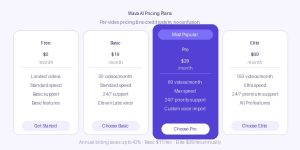
Annual billing reduces costs noticeably. The basic plan drops to approximately $11 per month on an annual commitment, and the elite tier comes down to around $39 per month.
All paid tiers include access to ElevenLabs voiceover, free stock footage library, and custom voice import. Creators starting out can test the platform on the free tier before committing to a paid plan. Compared to hiring a freelance video editor or purchasing tools like Adobe Premiere Pro, even the pro plan represents significant savings.
Wava AI Vs. Traditional Video Editing
For anyone comparing Wava AI to tools like Adobe Premiere Pro, DaVinci Resolve, or Final Cut Pro, the trade-offs are clear.
| Factor | Traditional Editing | Wava AI |
| Learning curve | Steep — weeks or months | Minimal — start in minutes |
| Production time per video | Hours | Under 10 minutes |
| Technical skill required | Advanced editing knowledge | None |
| Creative flexibility | Unlimited | Format and template-based |
| Software cost | High | Tiered, starting from free |
| Best suited for | Professional productions | High-volume short-form content |
Traditional editing tools give you complete control over every frame. Wava AI gives you speed and simplicity within the formats it supports. For creators who value publishing volume and content consistency over cinematic precision, that trade-off strongly favors wava AI. This is especially true for digital marketers, affiliate content creators, and social media managers handling multiple accounts.
Real Advantages Worth Knowing
Near-zero learning curve. Most users can understand the complete workflow within a single session. There are no onboarding calls needed and no tutorials required before producing a usable video. Compare that to the steep learning curve of professional video software, and the difference is dramatic.
Speed is the genuine differentiator. The gap between idea and published video shrinks from hours to minutes. For creators who have struggled with procrastination or content production bottlenecks, removing that friction changes the game entirely.
Consistency becomes achievable. One of the hardest challenges in building a content channel is maintaining regular publishing frequency. When each video takes a few minutes rather than an entire afternoon, staying consistent becomes far more realistic. Algorithms on TikTok and YouTube Shorts reward consistent publishers.
Your writing quality becomes visible immediately. When production effort drops to near zero, the quality of your script writing becomes the main variable. A strong prompt or well-written script produces a strong video. A weak one makes that weakness obvious fast. This can actually accelerate a creator’s improvement over time.
Honest Drawbacks To Consider
Creative uniformity over time. After several weeks of consistent use, the videos can start to feel similar in pacing, rhythm, and emotional tone even when the scripts differ. The stock footage library the AI selects automatically is finite, and the same clips will start repeating if you publish frequently. Treating Wava AI as an accelerator rather than a complete creative solution helps counter this.
Customer support concerns are real. Multiple independent reviews on Trustpilot, which currently sits at 2.7 out of 5 for the platform, mention difficulties reaching support, bounced emails, and unclear subscription cancellation processes. Before committing to a paid plan, confirm the exact cancellation steps. Paying through a method that offers dispute options adds an extra layer of protection.
It gets you 70 to 80 percent of the way. Wava AI delivers a strong draft, not always a finished product. Many experienced creators run the output through a secondary video editing app like CapCut for final adjustments before publishing. Expecting the AI to handle everything with no review is where quality issues tend to surface.
Who Should Use Wava AI?
New faceless creators running niche channels in categories like finance, motivation, history, or true crime will get the most value. If you want to publish consistently without learning a full video editing suite, Wava AI gets you a publishable video faster than any alternative.
Social media managers and small business owners who need regular short-form video marketing content but lack the time or budget for a dedicated video team will find the turnaround time genuinely useful.
Content agencies managing multiple client accounts can use the pro or elite tiers to scale weekly output significantly without proportional increases in production time.
Affiliate marketers and bloggers looking to repurpose their written content into video content for YouTube Shorts or TikTok will find the auto clipper and story generation features particularly valuable.
Hobbyists uploading once or twice a week may find that free alternatives like CapCut serve their needs well enough without a monthly subscription.
Best Wava AI Alternatives In 2026
If Wava AI does not feel like the right fit, these alternatives are worth evaluating:
Capcut: The strongest free option. Handles script-to-video generation and includes a full editing suite with no watermark on basic exports. Best for creators who want more hands-on creative control over their short-form content.
Pictory: Built for repurposing blog posts, podcasts, or long-form videos into short clips. Better suited for content marketers than faceless channel builders.
Invideo AI: Uses a conversational workflow where you describe what you want, and the tool assembles a draft. Good for beginners who prefer a guided AI video creation experience.
Opus clip: Purpose-built for extracting viral-ready clips from long recordings. Includes AI virality scoring to help prioritize the best moments for social media distribution.
Conclusion
Wava AI delivers exactly what it promises: fast, faceless short-form videos with minimal effort. The ElevenLabs voice quality and split screen automation put it ahead of most competitors at this price point. Customer support concerns are real, so start on the free tier before committing.
For faceless creators, marketers, and small business owners who need consistent video output without the editing grind, wava AI earns its subscription. Pair it with a strong script and a quick review before publishing, and your content will hold up.
Frequently Asked Questions
Does Wava AI require any video editing experience?
No. The platform handles all editing automatically. You input a topic or script, and the AI produces a finished video without any manual editing steps. It is designed for non-technical creators who want results without the learning curve.
What types of videos can I create with Wava AI?
You can create text story videos, split screen clips with narration, and custom voiceover videos. All formats are optimized for short-form video platforms, including TikTok, Instagram reels, and YouTube shorts.
Is Wava AI good for building a faceless YouTube channel?
Yes. The platform is specifically designed for faceless content creation. It generates narrated story videos and split screen clips without requiring you to appear on camera or record your own voice.
Can I use wava AI on a mobile device or Chromebook?
Yes. Wava AI is entirely browser-based and runs in any modern browser without downloads or plugins. It works on smartphones, tablets, Chromebooks, and laptops equally, making it a truly cross-platform video tool.
Is Wava AI legitimate or a scam?
Wava AI is a real, operational platform. No evidence of fraud exists. However, multiple user reviews flag customer support responsiveness and subscription cancellation processes as genuine concerns worth knowing before signing up.
Read more info visit: https://searchenginegeneral.com/



